


When you add a new unit to a multi-unit system or when a repaired unit is back. You must be aware that they could have a different SW version and a different configuration.
In order to avoid conflicts, before starting the system, you must follow this procedure:
Save all files from the old units to the SD card when disconnected from the new one (rcc settings/save and restore/save all files {5041}).

- Install physically:
- Electrical Wiring: communication cables in Studer bus. The positions of the devices is important (xt, vt and vs in the middle and accessories at the ends of the bus).

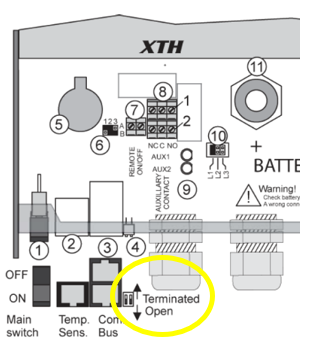
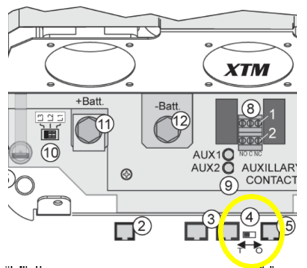
- Termination bus switch. If the inverter is situated at the end of the communication bus the switch must be adjusted in “T” position. If not it should be adjusted in “O” position (Images below show switch location).

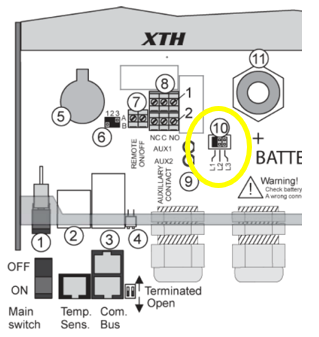
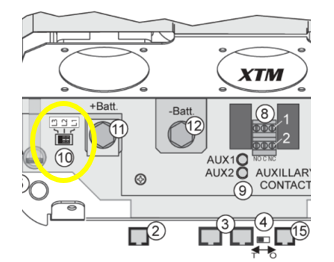
- Phase Selection jumper. change the jumper to indicate to the new inverter in which phase it will be located. Adjust in L1, L2 or L3 (Images below show jumper location).

- Update the software to the latest version.
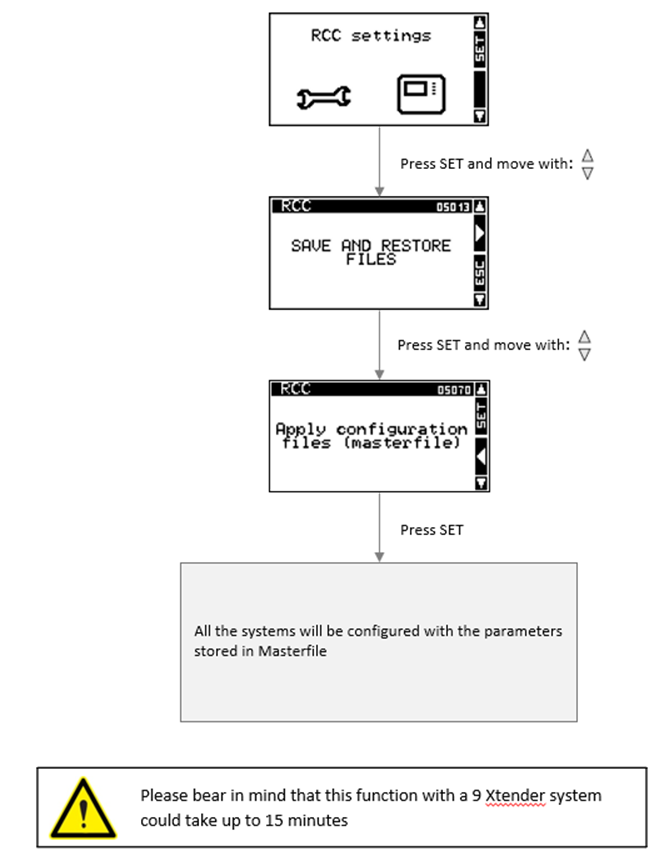
- Apply configuration files (rcc settings/save and restore/apply configuration files (Masterfile) {5070}) that have been created on SD card during point 1.
- Start the system
In the rcc you only see the settings from the master, not from all units, so it is always better to apply settings using the master so all units have the same configuration.